I bought this simple USB audio-interface when I still had one of those iBook G4’s with only a line-out but no line-in. (What were they thinking at Apple HQ?) You can get one for about €35,-/$40,- but any soundcard with at least one line-in and out will be able to pull this simple trick off.
Now, before we start I wanna mention that this will only work on a Mac, since they’re able to use multiple sound-cards at the same time as an aggregate device. Once you’ve got such an aggregated device up and running, you should have at least 4 outputs (or 2 stereo outputs) and 2 inputs (1 stereo line-in.) I did this by combining the Griffin iMic and the build-in soundcard (Figure 1).
Connect the line-out of the external effect to the line-in of the sound-card and the line-in of the effect to the line-out of the sound-card. When using a simple device like the one above together with the a Kaosspad, use a stereo RCA cable with a stereo mini-jack at the other end. But this might vary depending on what audio-interface you are using as well as what effect you are connecting it too. A mono effect like a distortion pedal (for a guitar) works a little different, but it’s perfectly possible with most sound-cards.
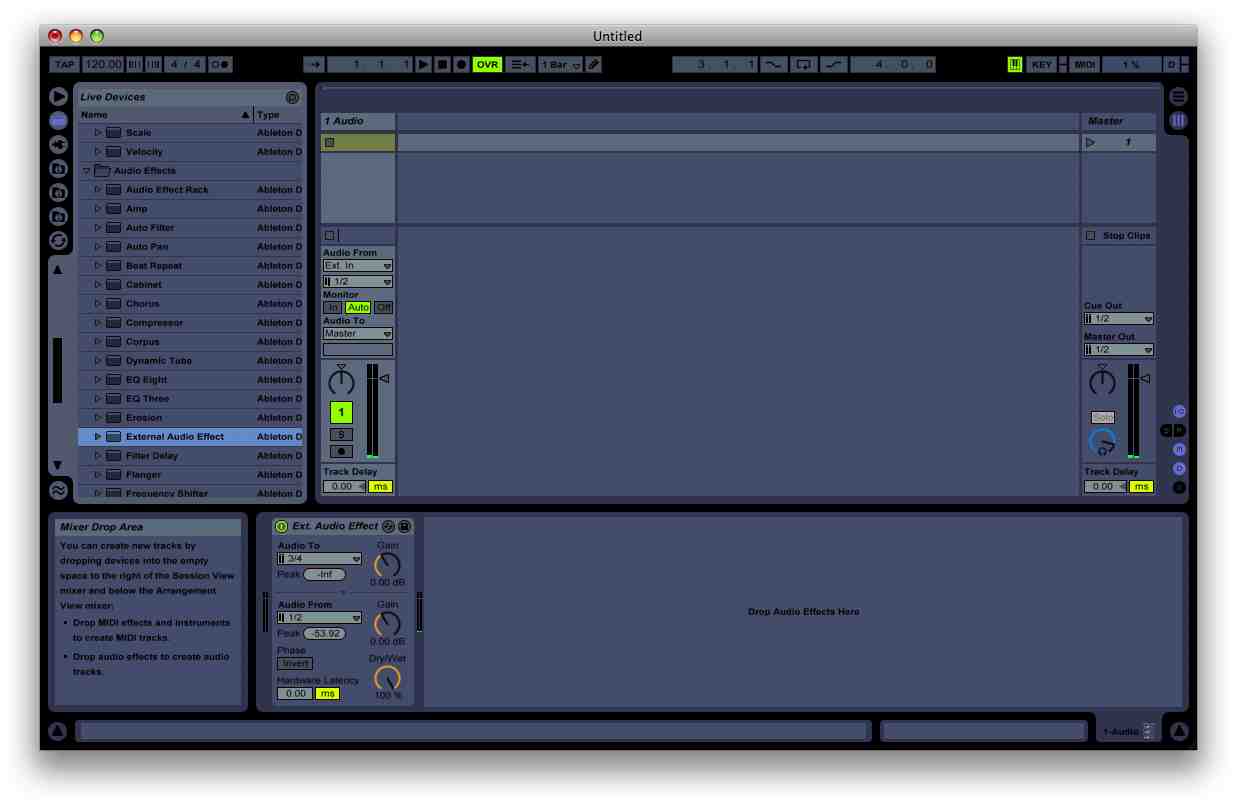
Now set-up a channel in Ableton and use the “external effect” device. And select your freshly created send and return channels Like this (Figure 2):
Now you should be able to use the effect. If not, try different channels but watch out for creating feedback loops! If you have any questions, feel free to ask me in the comments!
While the city settles into dusk, REVEAL residents teemup, Mavanov, Son of 8-Bits and Rimini…
Sunday, May 31st 14:00 - 20:00 Brewpub De Kromme Haring Europalaan 2C, Utrecht DRMR teemup…
E23 Records is a signal from the void, a broadcast for lost souls navigating endless…
Sunday November 23rd: DISCORD DISCO at De Kromme Haring in Utrecht! A day…
Happy to announce my ADE debut at the Q-Factory on the 23rd of October 2025…
Zenon Records arrives in the Netherlands, bringing its signature blend of deep, hypnotic techno and…